
 Eric Jorge Seguí Parejo
A total of 68% of online traffic starts with an organic search (BrightEdge).
If, as well as auditing, you want to cut down on monthly work, it makes sense to look at how to automate SEO reports by connecting data sources, KPIs, templates and alerts without losing judgement.

If your website has unresolved technical problems, that traffic doesn’t reach you and you probably don’t even know you’re losing it.
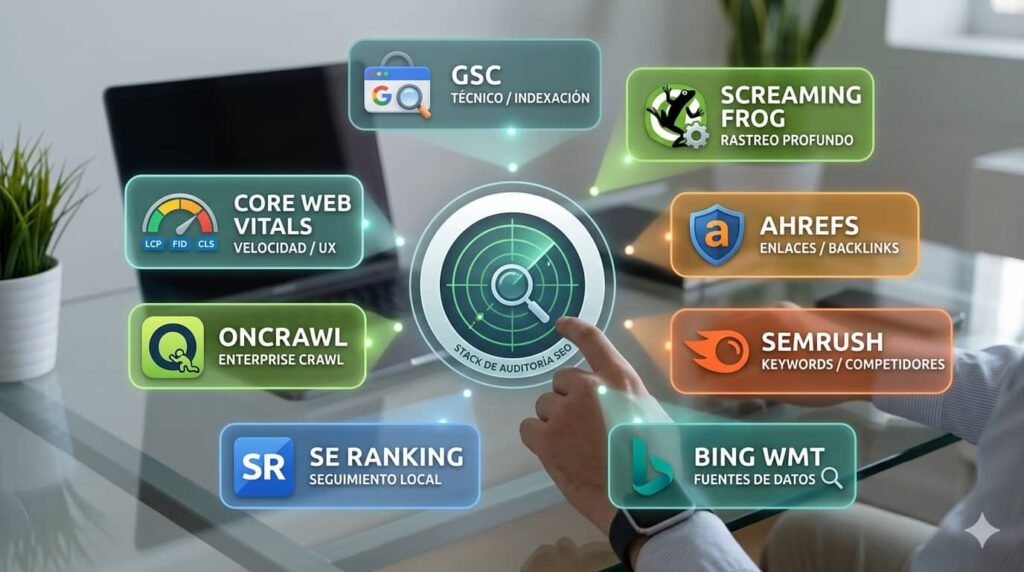
This article looks at the 8 best tools for carrying out an SEO audit. If you use these tools regularly, it’s worth connecting them to a workflow to automate SEO reports so you don’t depend on manual reviews every month.
What is an SEO audit and why does it matter?
An SEO audit is a systematic analysis of every factor that affects a website’s rankings in search engines. It isn’t just checking whether you have meta descriptions; it’s diagnosing the overall health of your organic presence.
Think of it as your website’s MOT. Without it, you’re driving without knowing whether the brakes work. Everything seems fine until the engine cuts out on the motorway. Exactly the same happens with SEO. Problems build up silently until traffic falls by 40% from one month to the next.
Google updates its algorithm thousands of times a year according to official figures. Each update can shift the results, and the most vulnerable sites are the ones piling up technical errors. An audit pinpoints exactly what is blocking your traffic, which can be between 30% and 40% of the total, although these percentages can vary.
A full SEO audit covers three fundamental pillars:
- Technical SEO: speed, crawling, indexing, URL structure, structured data
- On-page SEO: content, keywords, meta tags, heading structure, internal links
- Off-page SEO: backlink profile, domain authority, brand mentions
It also isn’t only useful for spotting problems; it helps you uncover opportunities too, such as pages sitting in positions 8-15 that could break into the top 5 with a little optimisation, or content that attracts traffic but doesn’t convert.
Benefits of carrying out an SEO audit
The benefits of auditing your website regularly go far beyond «improving SEO». These are the concrete, measurable effects:
- Early detection of penalties: you identify actions that could harm your SEO in Google before they wipe out your visibility
- Crawl budget optimisation: especially critical for e-commerce sites with thousands of pages. The aim is to reduce 4xx errors and unnecessary redirects, so Google crawls more useful pages per visit
- Better user experience: the technical problems that hurt SEO (speed, mobile usability) also have a direct impact on the conversion rate
- Identifying content opportunities: high-potential pages that aren’t being exploited, semantic gaps, keyword cannibalisation
How often should you do an SEO audit?
The ideal frequency depends on the size and type of your website:
| Type of website | Size | Recommended frequency |
|---|---|---|
| Personal blog / small corporate website | < 500 pages | Every six months – Yearly |
| Medium corporate website / SaaS | 500 – 10.000 pages | Quarterly – Every six months |
| E-commerce / content portal | > 10.000 pages | Monthly or continuous monitoring |
Beyond the scheduled frequency, some situations call for an urgent, immediate audit:
- Domain migration or change of URL structure
- Change of CMS (for example, from WordPress to Shopify)
- Complete website redesign
- Sharp drop in organic traffic of more than 20% in 2-4 weeks
- After a Google core update (Helpful Content Update, Core Update)
- A manual penalty flagged in Google Search Console
A one-off audit is an exhaustive analysis at a given moment, whereas continuous SEO monitoring is the automated tracking of key metrics. The ideal is to combine both: continuous monitoring with tools such as GSC and periodic full audits with crawlers such as Screaming Frog.
Criteria for choosing the best SEO audit tools
Before diving into the list, you need to know what to look for. No tool covers 100% of the aspects of an SEO audit. The winning strategy is always to combine tools.
The leading paid tools such as Se-ranking, SEMrush, Ahrefs, Moz, OnCrawl or Screaming Frog SEO Spider/Log Analyzer (among others) cost between 99€ and 449€/month (or more depending on the plan).
Before choosing, ask yourself these questions:
- How many pages does your website have?
- Which CMS do you use? WordPress, Shopify, Wix? Some tools have native plugins
- Do you have GA4 set up? Tools that integrate GA4 are worth far more
- What is your technical level? Some tools come with a learning curve
- Do you need to analyse competitors or just your own site?
Key features an SEO tool should have
These are the features you should assess when looking at any SEO audit tool:
Essential:
- Crawling and indexing: detection of 404 errors, redirects, pages blocked by robots.txt
- Speed analysis and Core Web Vitals
- On-page audit: meta titles, meta descriptions, H1-H6 tags, duplicate content
- Basic backlink analysis: number of referring domains, broken links
- Data export to CSV or Excel
- Detection of Schema Markup / structured data problems
Nice to have:
- Keyword research with search volume
- Competitor analysis
- Rank tracking
- Integration with Google Analytics 4
- AI features for optimisation suggestions
- Automatic alerts for critical changes
Differences between free and paid tools
The difference isn’t just price. It’s depth, frequency and scale. Here are the specific limits of the main tools:
| Tool | Free version | Paid version |
|---|---|---|
| Screaming Frog | 500 URLs per crawl | Unlimited (245€/year) |
| SEMrush | 10 searches/day | From 117$/month |
| Ahrefs Webmaster Tools | Limited backlink data, your site only | From 119€/month |
| Moz | 10 queries/month | From 49$/month |
| Se-Ranking | Limited 1-month demo | Unlimited (from 47€/month) |
| OnCrawl | Limited demo | I don’t remember, but I think it was more expensive than Semrush. |
The 8 best tools for an SEO audit
You can use each tool on its own, but the most thorough audit comes from combining them.
1. Google Search Console
Google Search Console (GSC) is, beyond any doubt, the basic tool for anyone doing SEO. Its data comes straight from Google.
These are the features that make it essential:
- Performance report: clicks, impressions, CTR and average position by page and by keyword.
- Index coverage report: indexed pages, indexing errors, excluded pages and the reasons why
- Built-in Core Web Vitals: real user data on LCP, CLS and INP, split by mobile and desktop, based on user data collected by the Chrome browser.
- Page experience report: mobile usability, HTTPS, no intrusive ads
- URL inspection tool: shows how Google sees a specific URL, whether it is indexed and when it was last crawled
- Rich results report: detects structured data problems that prevent rich snippets from showing.
- Manual penalty alerts: direct notifications if Google applies a manual action to your site
- Sitemap submission and reindexing requests
A 100% free tool with access to data from the last 16 months since it was activated.
Pros:
- 100% real data from Google, not third-party estimates
- Free
- Automatic alerts for critical indexing problems
- Seamless integration with the whole Google ecosystem
- Rich results report for structured data
Limitations:
- Doesn’t analyse backlinks in detail
- Doesn’t offer competitor analysis
- Only shows up to the top 1.000 keywords per view/filter (lower-volume ones stay hidden)
- Doesn’t track keywords that generate zero impressions
- The interface can feel complex for users without technical experience
2. Google PageSpeed Insights
If Google Search Console tells you which pages have performance problems, Google PageSpeed Insights tells you exactly why and how to fix them. It is Google’s official tool for analysing loading speed and Core Web Vitals.
What sets it apart from other speed tools is that it combines two types of data that very few users know how to tell apart:
- Field data (CrUX): real metrics from Chrome users who have visited your website in the last 28 days. This is the data Google uses as a ranking signal
- Lab data (Lighthouse): simulated analysis under controlled conditions. Useful for diagnosing problems even if your site gets little traffic
The Core Web Vitals metrics it analyses:
- LCP (Largest Contentful Paint): time until the largest element is visible. Target: < 2,5 seconds
- INP (Interaction to Next Paint): replaced FID in March 2024. Measures responsiveness to user interactions. Target: < 200ms
- CLS (Cumulative Layout Shift): visual stability of the page. Target: < 0,1
Each problem detected comes with a specific recommendation with an estimated impact in seconds saved. You can prioritise actions by the loading time they save.
Completely free, no sign-up, and it analyses any public URL in seconds. Sites with little traffic may have no field data available in CrUX; in that case you’ll only see lab data, which is enough for diagnosis but doesn’t reflect your users’ real experience.
Pros:
- Official Google data for Core Web Vitals (the same data it uses for ranking)
- No sign-up and no usage limits
- Recommendations prioritised by real impact
- Analyses mobile and desktop separately
- Combines real user data with detailed technical analysis
Limitations:
- Analyses only one URL at a time, no bulk crawling
- Doesn’t offer historical tracking of metrics
- Doesn’t analyse other SEO aspects: content, backlinks, keywords
- Sites with little traffic may have no data
3. Screaming Frog SEO Spider
Screaming Frog is the most powerful technical tool available in a free version for websites. It’s a crawler that crawls your website the same way Google does, analysing every URL and extracting technical data in bulk.
What you can do with it, among other things:
- Full crawl of up to 500 URLs: detects every technical error in a single pass
- Detection of 404 errors (pages not found) and analysis of 301/302 redirects
- Meta title and meta description audit: identifies duplicates, titles that are too long or too short, empty descriptions
- H1 and H2 tag review: detects pages with no H1, a duplicate H1 or multiple H1s
- Image analysis: missing alt text, oversized images
- Detection of internal duplicate content
- Internal link analysis: linking structure, orphan pages, crawl depth
- Full CSV export for further analysis in Excel or Google Sheets
- Segmentation
- Data blending with other tools
- Data search and extraction using selectors and/or XPath
- Different types of configuration, crawl modes, scheduled crawls and comparisons between crawls.
Pros:
- The most complete technical crawling tool
- Bulk URL analysis in a single operation
- Full data export for advanced analysis
- Frequent updates and active support
- Available on every operating system
Limitations:
- For large websites, you need a more powerful computer
- Doesn’t analyse external backlinks unless it’s connected to other tools
- Requires local installation (it isn’t a web-based tool)
- Moderate learning curve for non-technical users
4. Ahrefs Webmaster Tools
Ahrefs Webmaster Tools (AWT) is one of the most powerful SEO platforms on the market. It requires you to verify ownership of your site, but in return it gives you access to backlink data that no other tool can match.
Features available at no cost:
- Technical site audit (Site Audit): full crawl detecting more than 100 types of technical SEO problems.
- Backlink analysis: number of referring domains, backlink URLs, anchor text, link status (follow/nofollow)
- Organic keywords report: keywords your site ranks for, with position, estimated volume and traffic
- Detection of top-performing pages and opportunities for improvement
- Alerts for new and lost backlinks
- Site health score: overall technical health score broken down by category
Pros:
- The best backlink analysis available
- Organic keyword data with metrics
- Clear, well-designed interface
- Frequent index updates
5. SEMrush
SEMrush is the most complete SEO platform on the market, and it offers a very valuable overview of your site and your competitors.
With an account you can access:
- Domain analysis: estimated organic traffic, number of ranking keywords, traffic value
- Keyword research: search volume, difficulty, CPC, trend
- Competitor analysis: you can see the main keywords of any domain
- Site Audit: crawl with technical error detection
- Keyword tracking in the rank tracker
- Backlink analysis with the main referring domains
Pros:
- A tool with competitor analysis
- Very large keyword database
- Very intuitive interface, ideal for beginners
- Reliable estimated traffic data for benchmarking
6. Bing Webmaster Tools
Bing Webmaster Tools is SEO’s great forgotten tool. Most professionals ignore it, and that’s a mistake. Bing accounts for between 6% and 10% of searches in Spain, and its free tool offers features that complement Google Search Console perfectly.
Standout features:
- SEO Reports: automatic technical audit detecting on-page errors, crawl problems and recommendations for improvement
- Keyword Research: keyword research with Bing data, useful for finding opportunities that GSC doesn’t show
- Backlink Analysis: analysis of the inbound link profile using data from Bing’s index
- Site Scan: automated audit that detects SEO problems and prioritises them by impact
- Crawl reports: indexing errors, blocked pages, sitemaps
- Integration with GSC: you can import your site directly from Google Search Console
Pros:
- A complete, free SEO audit tool that is heavily underused
- Keyword research with no daily limits
- A complementary perspective to GSC with data from a different search engine
- Direct import from Google Search Console
Limitations:
- Data based on Bing’s index, not Google’s
- Less relevant in markets where Google has almost 100% dominance
- Less polished interface than other tools
7. Se-Ranking
SE Ranking is an «all-in-one» SEO platform that has become hugely popular for offering premium-level tools at a much more affordable price.
Although it’s mainly known for its accurate rank tracker, its Website Audit module is exceptionally robust. It’s the ideal tool for agencies, freelancers and SMEs looking for the right balance between advanced functionality and cost, without having to pay for licences for the most expensive options on the market.
Standout features:
- Thorough Website Audit: crawls the entire site looking for technical problems (4XX/5XX errors, speed, meta tags, indexability) and assesses its overall state with a «Site Health» metric.
- Fix instructions: it doesn’t just list technical errors; it groups problems by urgency and gives detailed explanations and practical steps on how to fix each one.
- Rank tracking (Rank Tracker): daily, highly accurate keyword tracking across different search engines, locations (down to postcode level) and devices.
- Competitor analysis: lets you find out which keywords your competitors rank for and analyse their organic and paid traffic strategies.
- Backlink monitoring: assessment of the inbound link profile to detect toxic domains and analyse the authority of the websites linking to you.
- White Label and reports: creation of automated, 100% customisable audit reports with your own agency’s logo and domain to present to clients.
Pros:
- Excellent value for money; it offers features similar to the market leaders (such as Semrush or Ahrefs) for a fraction of their cost.
- Modern, clean and extremely intuitive interface, which shortens the learning curve.
- Very flexible pricing (you can bring the cost down by choosing rank checks every 3 days or weekly instead of daily).
- Features designed specifically for agencies, such as white label or the built-in Lead Generator.
8. On-crawl
Oncrawl is an enterprise-level (business) technical SEO and log analysis platform. It is designed specifically to audit massive websites, such as large e-commerce sites, media outlets or classifieds with hundreds of thousands or millions of URLs. Unlike general-purpose SEO suites, Oncrawl specialises in technical depth, information architecture and understanding exactly how search engines interact with the server in order to optimise the crawl budget (crawl budget).
Standout features:
- High-performance SEO Crawler: a technical crawler capable of processing enormous websites, assessing architecture, content, indexability, performance and advanced JavaScript rendering (SSR/CSR).
- Log Analyzer: analysis of server log files to find out how Googlebot actually behaves on the website (crawl frequency, status codes it encounters, etc.).
- Data blending (Data Integration): lets you merge crawl data with Google Search Console, Google Analytics, Adobe Analytics or CRMs to see the impact of technical SEO on traffic and revenue.
- Orphan page detection: identifies URLs that are crawled by Googlebot or receive traffic but get no internal links from the website’s own structure.
- Crawl over Crawl (Comparison): compares audit results on different dates to measure technical progress and the impact of the fixes implemented.
- Advanced segmentation: lets you create custom groupings of URLs (by product category, page type, language) to audit and analyse performance by silo or section.
Pros:
- Massive processing capacity, ideal for enterprise projects where standard cloud tools fall short or crash.
- Log analysis provides real data on how Google crawls the site, so you can make technical decisions based on what actually happens on the server rather than on estimates.
- Exceptionally visual and customisable charts and dashboards, which make very complex website architectures easier to understand.
- Strong focus on data security (strict GDPR compliance).
Limitations:
- The learning curve is steep, as it requires advanced knowledge of technical SEO and data analysis to get the most out of it.
- Corporate-level pricing, which makes it out of reach (and unnecessary) for most freelancers, SMEs or small agencies.
- It’s an overly complex tool for small or local websites that don’t have crawl budget problems.
Comparison table of the 8 SEO audit tools
| Tool | Technical crawling | Backlinks | Keywords | Speed/CWV | Competitors |
| Google Search Console | ✅ Yes | ⚠️ Basic | ✅ Yes | ✅ Yes | ❌ No |
| Google PageSpeed Insights | ❌ No | ❌ No | ❌ No | ✅ Yes | ❌ No |
| Screaming Frog | ✅ Yes | ❌ No | ❌ No | ⚠️ Basic | ❌ No |
| Ahrefs Webmaster Tools | ✅ Yes | ✅ Yes | ✅ Yes | ❌ No | ❌ No |
| SEMrush | ✅ Yes | ✅ Yes | ✅ Yes | ⚠️ Basic | ✅ Yes |
| Bing Webmaster Tools | ✅ Yes | ✅ Yes | ✅ Yes | ❌ No | ❌ No |
| SE Ranking | ✅ Yes | ✅ Yes | ✅ Yes | ⚠️ Basic | ✅ Yes |
| Oncrawl | ✅ Yes | ❌ No | ❌ No | ⚠️ Basic | ❌ No |
How to combine these tools for a full SEO audit
An SEO audit isn’t done by a single tool; it’s done by the right stack of complementary tools. When you add paid options, you remove data limits, get access to real historical data and save dozens of hours cross-referencing information.
- Google Search Console + Bing Webmaster Tools: your non-negotiable starting point. It identifies real indexing problems, penalties and fluctuations in organic traffic. You’ll get full coverage of indexing, sitemaps and performance in the main search engines.
- Screaming Frog (Paid Licence): technical crawling that can render JavaScript, audit the full architecture and cross-reference data by connecting to the GSC and Google Analytics APIs.
- SE Ranking / SEMrush / Ahrefs: your «all-in-one» platform. It lets you audit on-page SEO automatically, track keywords daily and keep an eye on local competitors’ strategies for a very modest outlay.
- Google PageSpeed Insights: one-off analysis of your strategic URLs to make sure they meet the Core Web Vitals.
- Oncrawl: the heavy artillery for technical SEO. Essential on websites with thousands of URLs to cross-reference crawl data with server log analysis and fine-tune the crawl budget down to the last detail.
- Queseo SEO Analyser: it’s free and compares a specific page with Google’s top results for the keyword you choose. It’s useful for reviewing a URL before tackling the whole website. You’ll find it on the SEO analyser page.
To keep track of everything, it helps to have examples and checklists to work from. You can download your sample SEO audit template + Checklist here.
Frequently asked questions about SEO audit tools
How long does a full SEO audit take with these tools?
It depends on the size of the site and how deep the analysis goes. For a small website, a full audit can be done in roughly 1 or 2 days. For medium-sized sites, the time rises to 2-3 weeks of work. Large e-commerce sites with tens of thousands of URLs need audits lasting a month.
What key areas does an SEO audit tool analyse?
An SEO audit tool analyses three main areas. u003cstrongu003eTechnical SEOu003c/strongu003e covers crawling and indexing, loading speed, Core Web Vitals, mobile usability, HTTPS, URL structure, sitemaps and robots.txt. u003cstrongu003eOn-page SEOu003c/strongu003e includes meta titles, meta descriptions, heading tags (H1-H6), duplicate content, keyword density, structured data and internal links. u003cstrongu003eOff-page SEOu003c/strongu003e analyses the backlink profile: number of referring domains, link quality, anchor text and toxic links.
How often should you carry out an SEO audit?
The ideal frequency varies with the size and type of website. Small sites with fewer than 500 pages should carry out a full audit every year, backed up by a monthly review of Google Search Console to catch emerging problems. Medium-sized sites need audits every three or six months. Large e-commerce sites and portals with more than 10.000 pages should combine monthly audits with continuous monitoring. On top of that, you should always carry out an urgent audit after a domain migration, a website redesign, a change of CMS, or when you spot a drop in organic traffic of more than 20% over a period of 2 to 4 weeks.
When the audit is part of a service for third parties, it’s worth distinguishing between a technical tool and white-label SEO software for agencies.
Tools help, but they make more sense as part of an SEO plan with priorities, owners and measurement.
Tools help more when you know which metric you want to move and which action depends on it. For that reading, there’s the guide to improving SEO metrics.
As well as commercial tools, some projects need their own scripts and APIs. For that layer, there’s the guide to the Python SEO consultant in Valencia.
Tools help, but the diagnosis has to be adapted to the market. A geolocated example is the SEO audit in Gandia.

Technical SEO consultant in Valencia for more than 16 years. Speaker and organiser at WordCamp Valencia and author on the Semrush and Publisuites blogs. More about me


